
Operations software built the way your company works.
It has what you need and none of what you don't. It speaks in your words and nobody has to be trained to use it.
In production, with customers operating every day.
ARTIFICIAL INTELLIGENCE BUILT IN
Nobody has to be trained to use the system.
01YOUR COMPANY'S DICTIONARY
It speaks the way your company speaks. That's why nobody needs training.
If your company says "delivery run" and not "route", the system says "delivery run": on the screens, in the messages, in the app of whoever is out on the street, and in the assistants. And each company turns on only what it needs: what you don't use, you don't see.
Change the industry and the country, and watch the system change.
WHAT YOUR COMPANY CALLS IT
In green, what changed when you picked your industry and your country.
Same system, all interconnected, with different features specific to each industry, along with its own terms and words. Each industry has its own screens; the dictionary also adjusts by country and by company. The examples in this demo are illustrative.
What changes with your industry, and what's always there.
Entering and managing a trip is not the same as entering and managing a shipment: they are different screens and different apps. What follows isn't a set of loose modules, it's one system where every part knows the others.
WHAT CHANGES WITH YOUR INDUSTRY
One company can have several at once: TMS + LMD + WMS living together in the same account.
AND THIS CUTS ACROSS EVERYTHING
They aren't industries: they exist once and serve any of the ones above.
Integrations run against GPS tracking, accounting, and whatever else is needed.
It speaks the way you speak
If your company says "delivery run" and not "route", the assistant answers you that way, in the wording of your country or your company.
It answers about your operation
It doesn't give generic answers: it looks at the data in your account and tells you what happened and where to fix it.
No manuals
The help lives inside the system and gets fixed without waiting for a new release.
In production, with customers operating every day. Each one with its own system, built to fit.
Request a demo02WHO IT'S FOR
You're not buying a generic system. You pick how you work.
The industry doesn't matter: what matters is what you do with the goods. Pick the one closest to your operation.
Tap the one closest to your operation
WHAT ITERWAY HANDLES FOR YOU
IT ALREADY WORKS THIS WAY
The full detail on home delivery and e-commerce is in the last mile section.
WHEN SOMEONE ELSE DOES THE WORK
You delegate the execution. You don't delegate the visibility.
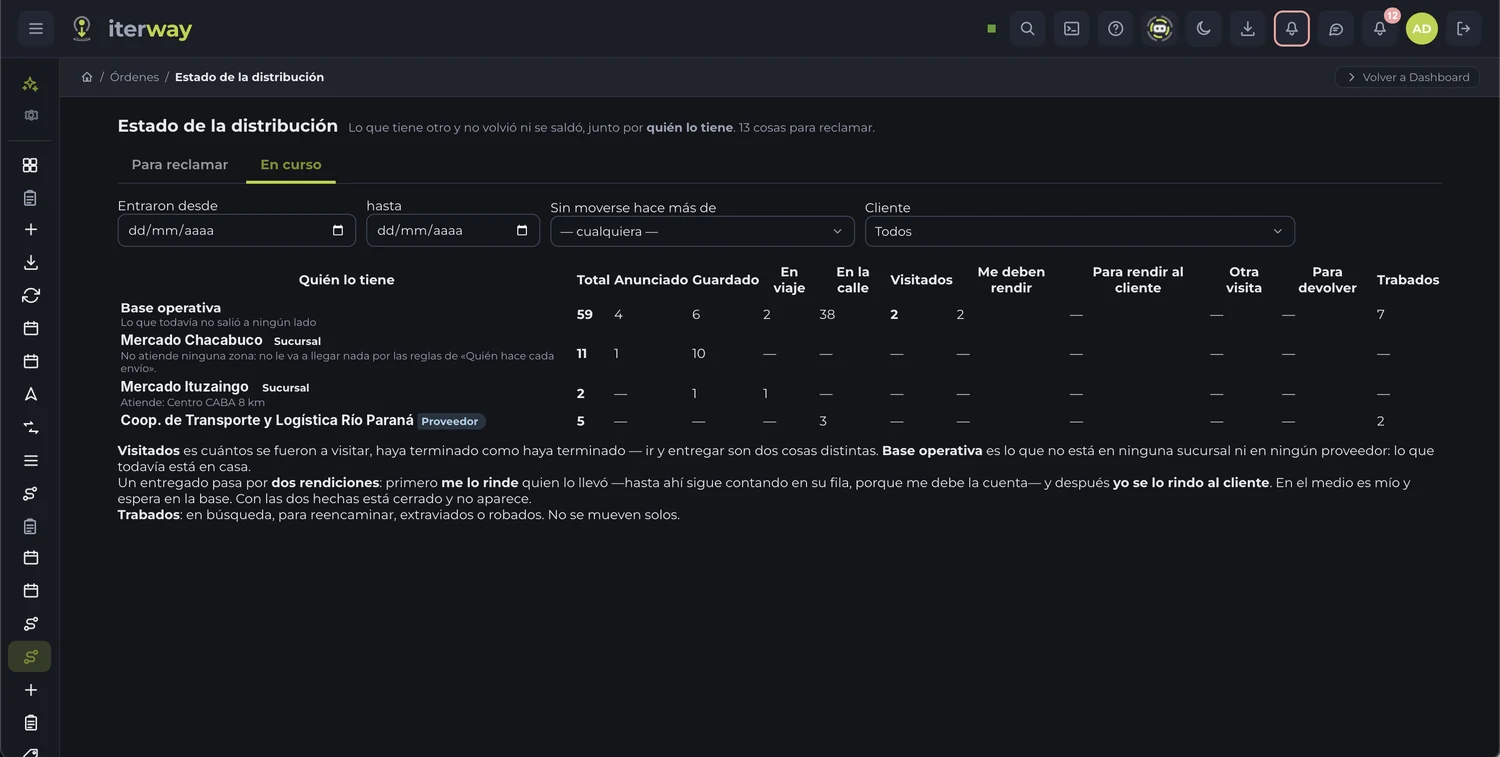
Your suppliers build their own routes with their own resources, and your branches run their own work. You still see who has each thing, since when, and what's left to chase.
You can start however you want
Not sure which one you are? Tell us how you work and we'll sort it out with you.
Try the systemWhat you don't use, you don't see.
Each company turns on only what it needs. Nobody pays for screens they'll never open, and nobody learns features that aren't theirs.
03WHAT YOU MANAGE
From the moment they order to the moment you collect and pay.
Everything your operation manages, in one place and on the same data. You use what you need.
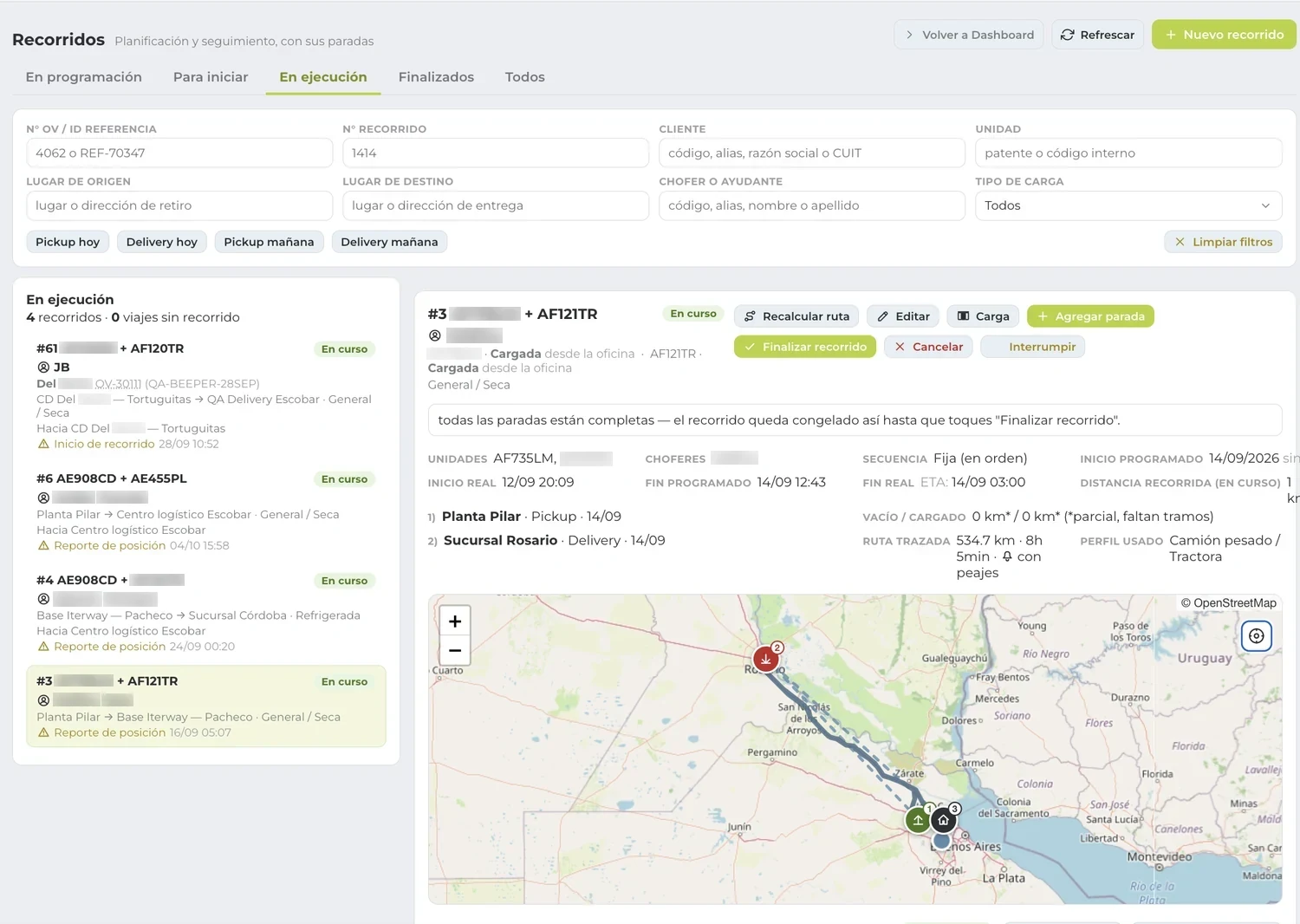
What they ask you for, turned into routes.
The day's proposals, planning, and cross-docking, with the unit and the driver assigned. Stops are detected on their own and it tells you when something goes off plan.
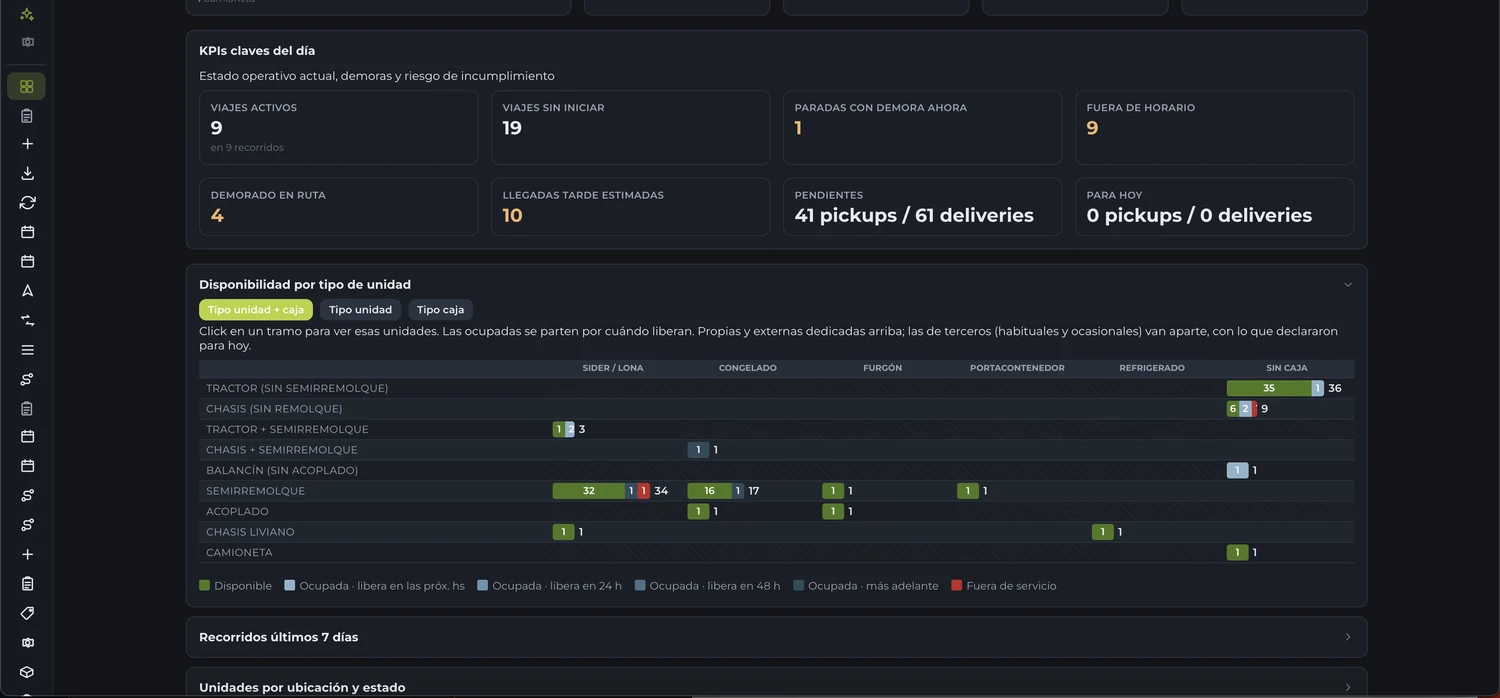
How the day is shaping up, before anyone asks.
What's active, what hasn't started, what's delayed, and what's going to arrive late. And next to it, which unit you have free, of what type, and since when.
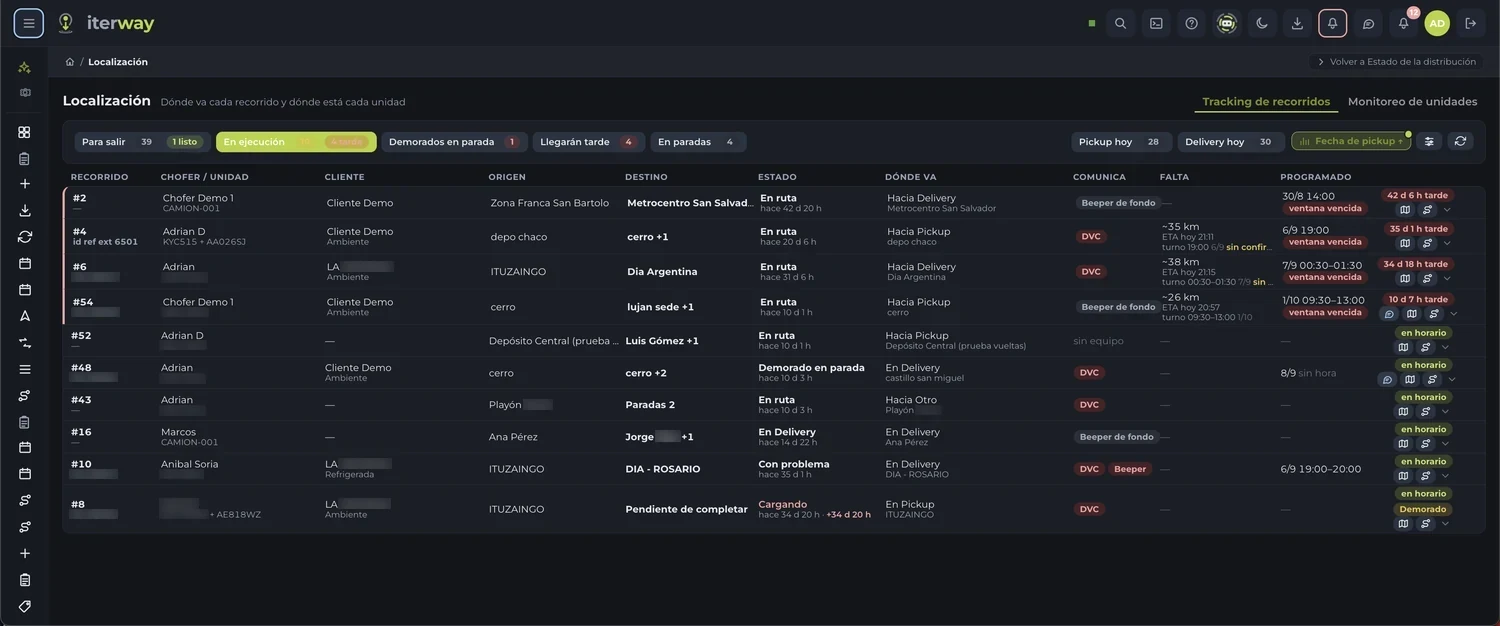
And if something goes off plan, the alert comes looking for you: nobody has to be watching the screen.
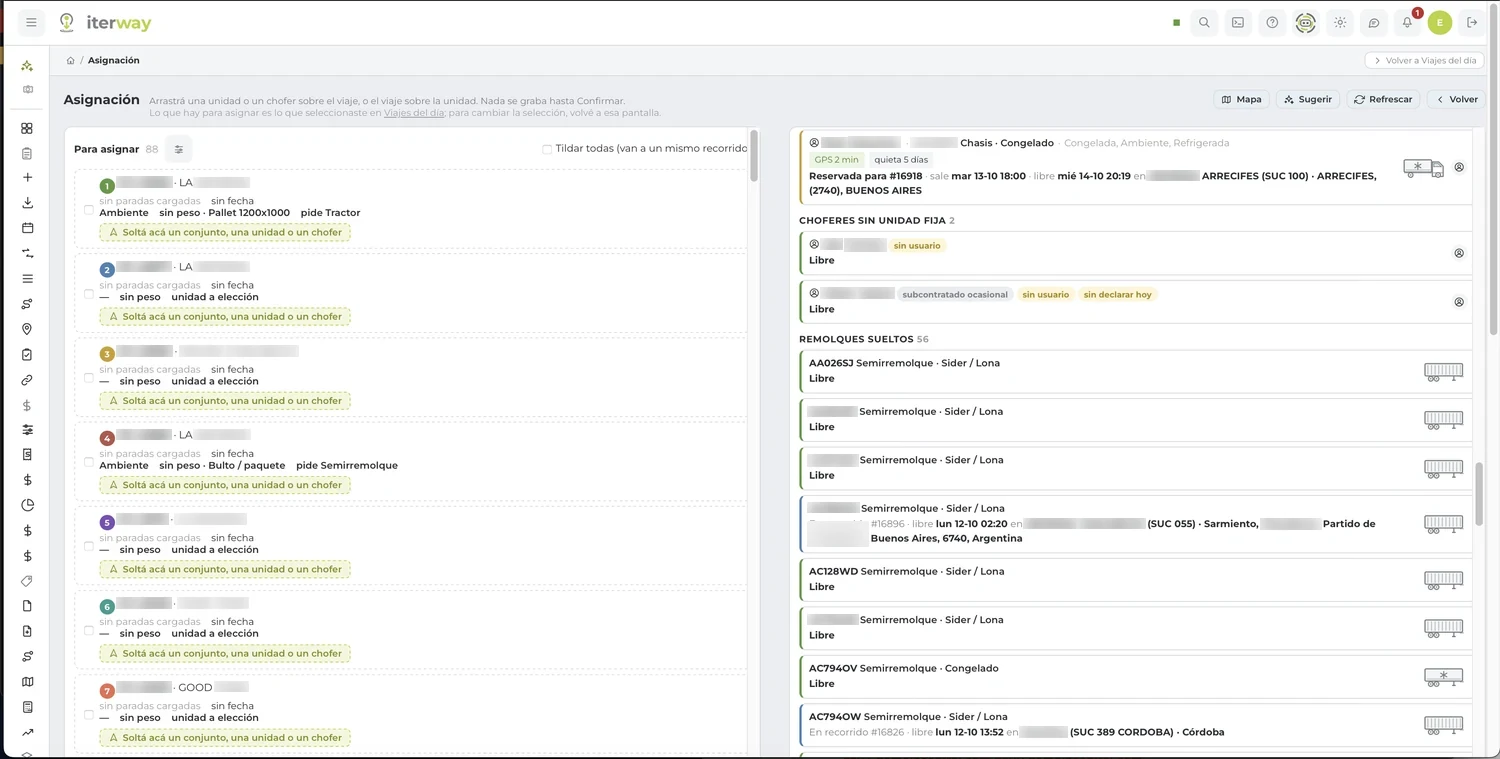
You drag a unit onto the trip. Nothing is saved until you confirm.
The system shows you which unit is free, since when and where, and which driver has it assigned. And if you want, it proposes the deployment for you.
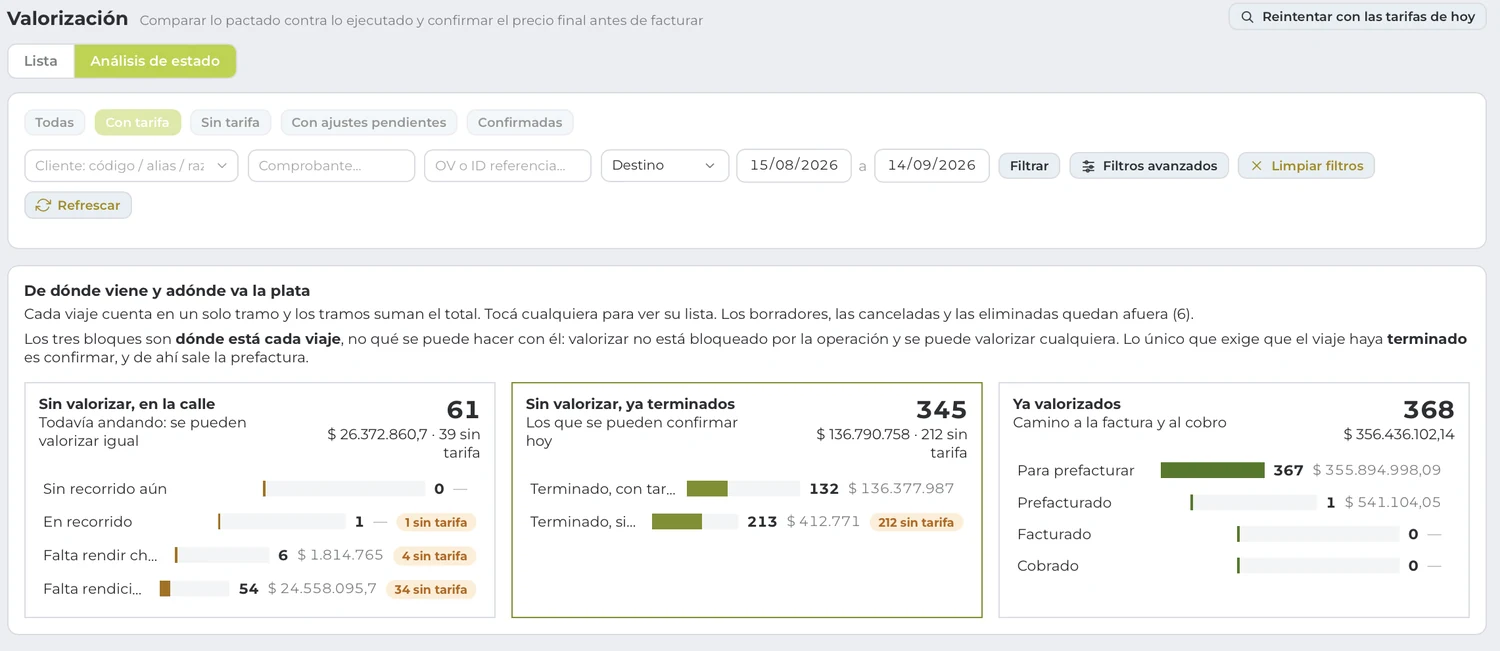
And from there to the invoice, with nothing entered twice.
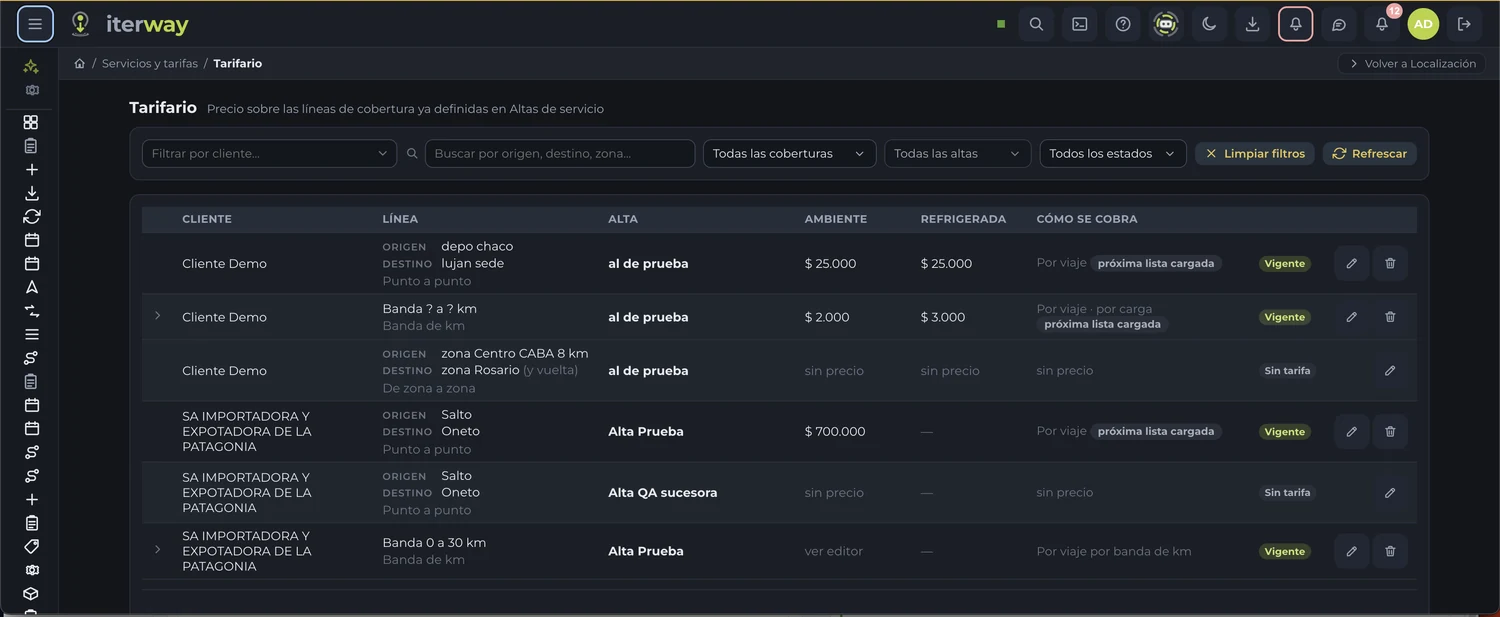
Your rate table the way you actually bill: per unit, per load, per zone. Then the settlements to your customers and the payouts to third parties and suppliers, with the balances clear.
Everything your operation manages
04TELEMATICS AND DEVICES
Tracking tells you where it is. Here you see what's going on with it.
Engine, fuel, doors, temperature, panic. If the device sends it, the system reads it: we're not tied to a list of devices.
What can be measured
Some of these signals are already running and others get declared based on the device you have. Tell us which one you need and we'll tell you how it ends up.
Fuel that measures itself
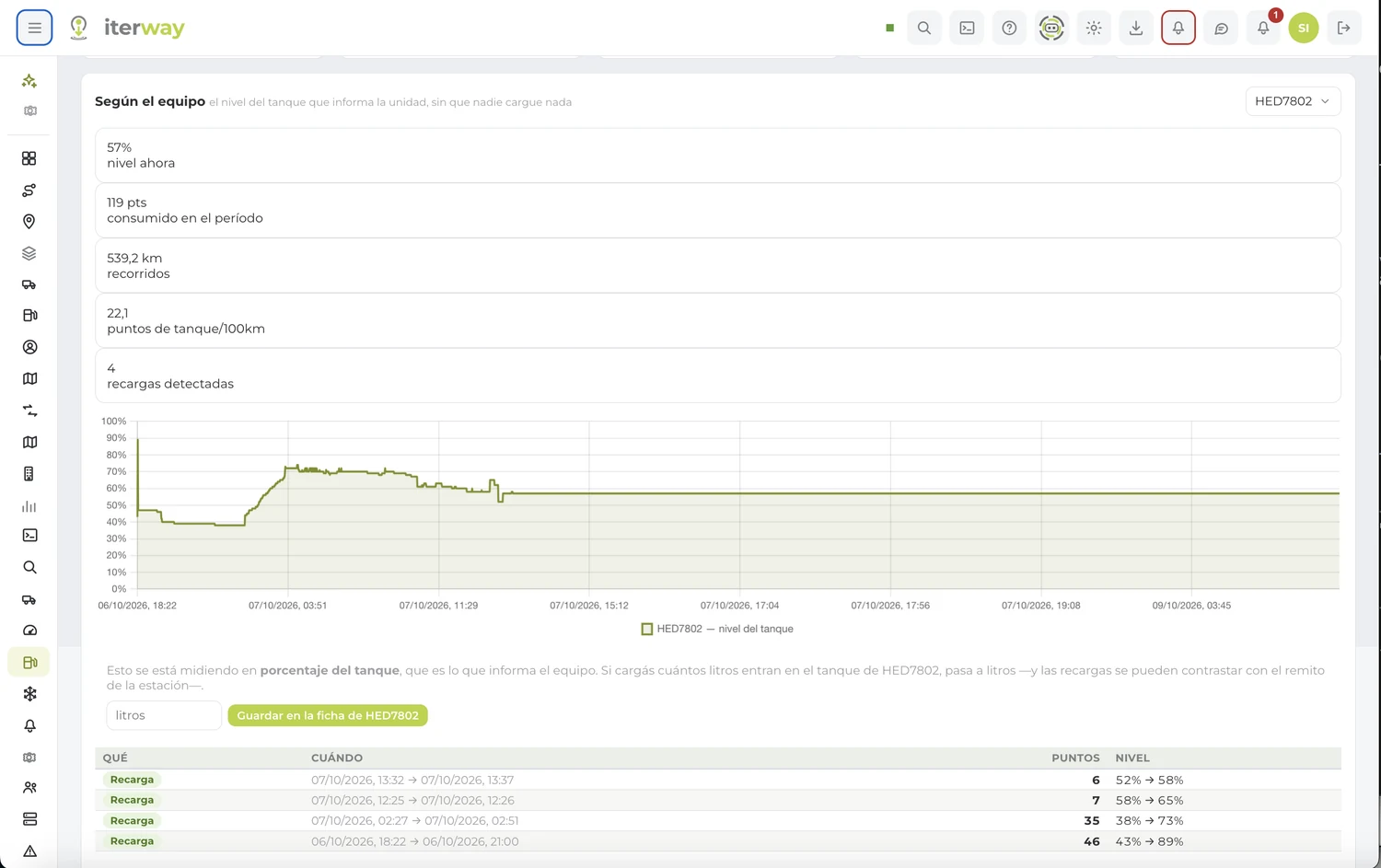
The tank level the unit reports, with nobody entering anything, with the refills detected and the consumption per hundred kilometers.
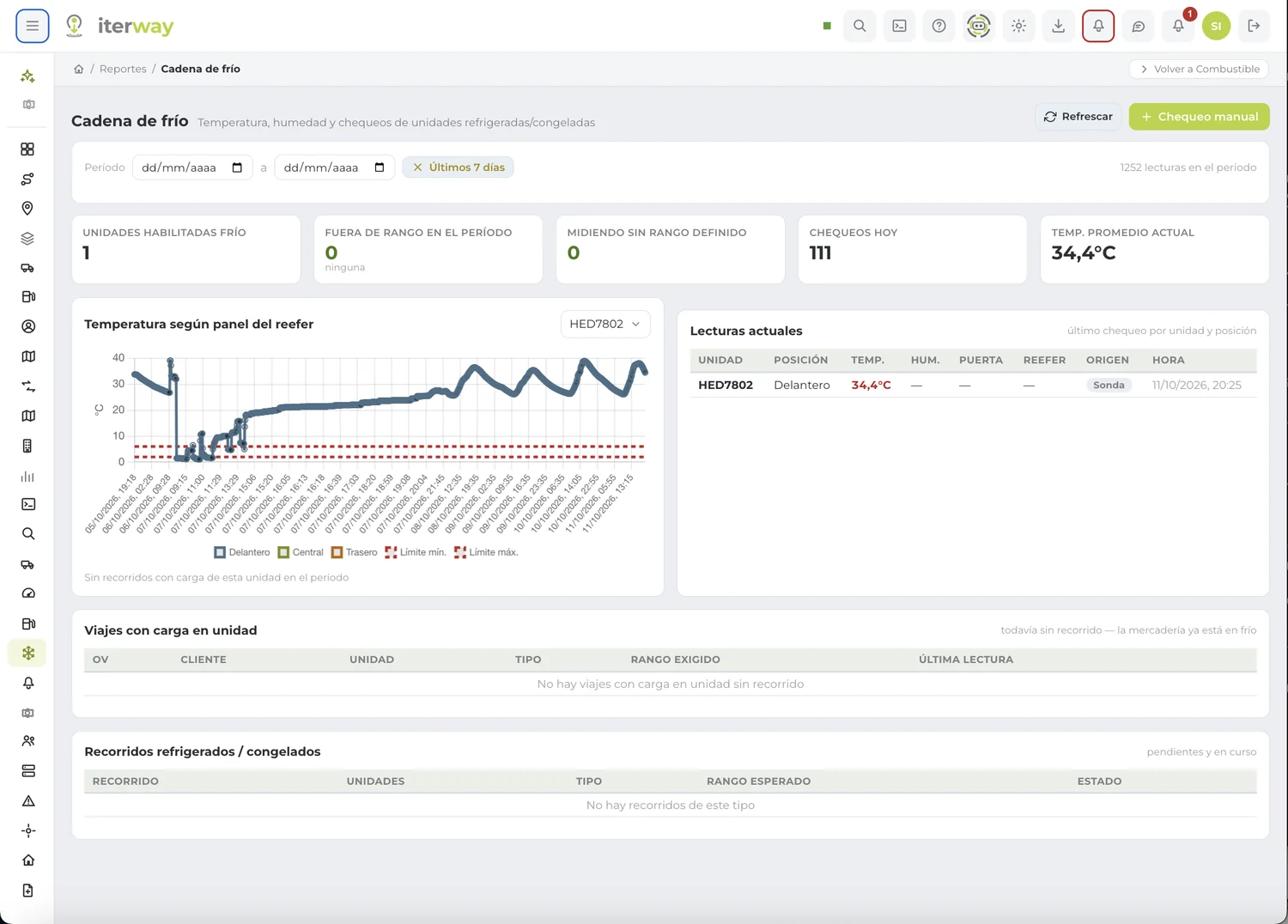
Cold chain, with its limit
Temperature and humidity by probe, with the required range marked and the out-of-range readings detected in the period.
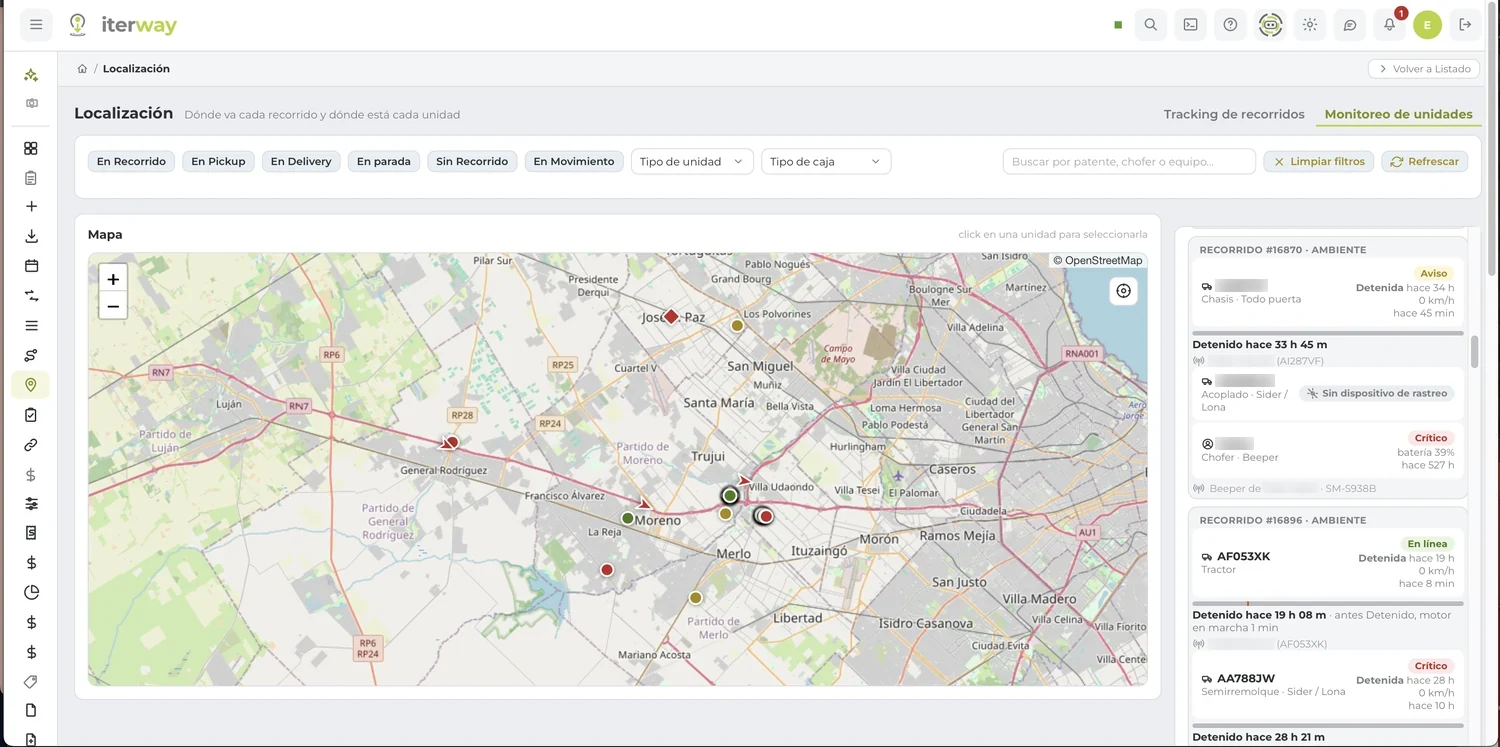
Where each route is headed and where each unit is
The map with all your units and, next to it, what's going on with each one: how long it's been stopped, which device it reports with, and what alerts it has open.
Four ways to get your fleet into the system
Want to start right now, without buying anything? The phone of whoever does the work reports position from Beeper. For now it reports with the app on screen.
ADDING A DEVICE IS DECLARING, NOT PROGRAMMING
You tell it what the device sends. It comes in on its own.
A signal is declared with its code, its meaning, its unit, and its scale. From there it shows up on the timeline, in the reports, and in the alarms. Pick an example:
SIGNAL DECLARATION · EXAMPLE
HOW IT SHOWS UP ON THE TIMELINE · EXAMPLE
Every number says where it came from
A person declares what each input is
The trailer door or the panic button gets defined by whoever installs it. That way no signal is read backwards.
If there are two sources, one wins
The device's odometer and the vehicle computer's odometer are not the same number. The system knows which one to use and tells you.
A report you can sign
Knowing where each number comes from is what separates a report you can trust from one nobody wants to sign.
Tell us what you want to measure and we'll see how.
Ask us about devices05LAST MILE AND E-COMMERCE
From the order to your customer's door, in a single flow.
Shipments, delivery, settlement, and tracking inside the same platform that handles the rest of your operation. Whether you deliver for others or ship your own sales.
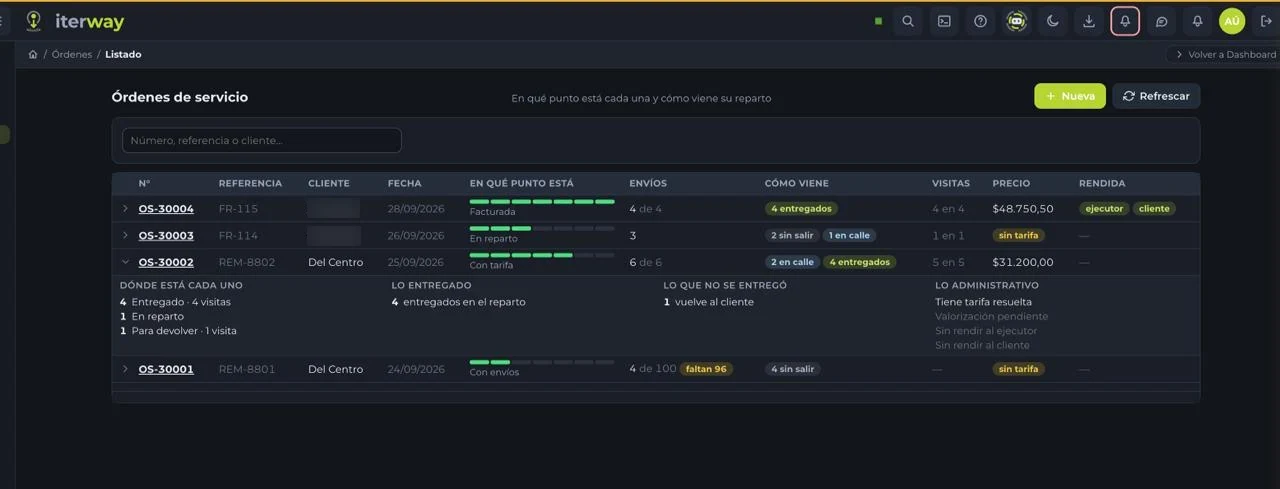
For whoever dispatches
The dispatch board brings together today's work, what's coming, and what's already out. You assign each shipment, build the manifests, and set the delivery protocols.
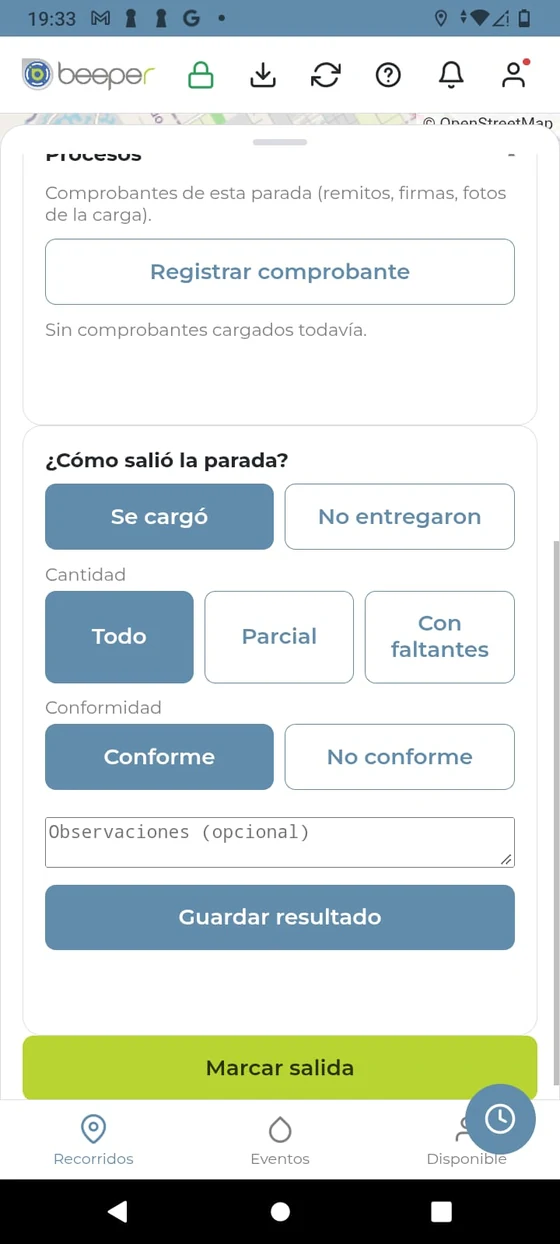
For whoever delivers
They see their run sheet, mark each visit, and scan with the camera, from Beeper. It opens in the browser: nothing to install. They see only their own work.
For whoever is waiting
One link to track their delivery. No username, no password, nothing to install.
YOUR ORDER
- Order received
- Picked
- On the way
- Delivered
WHOEVER IS WAITING ALSO DECIDES
Your customer isn't home. The delivery adjusts.
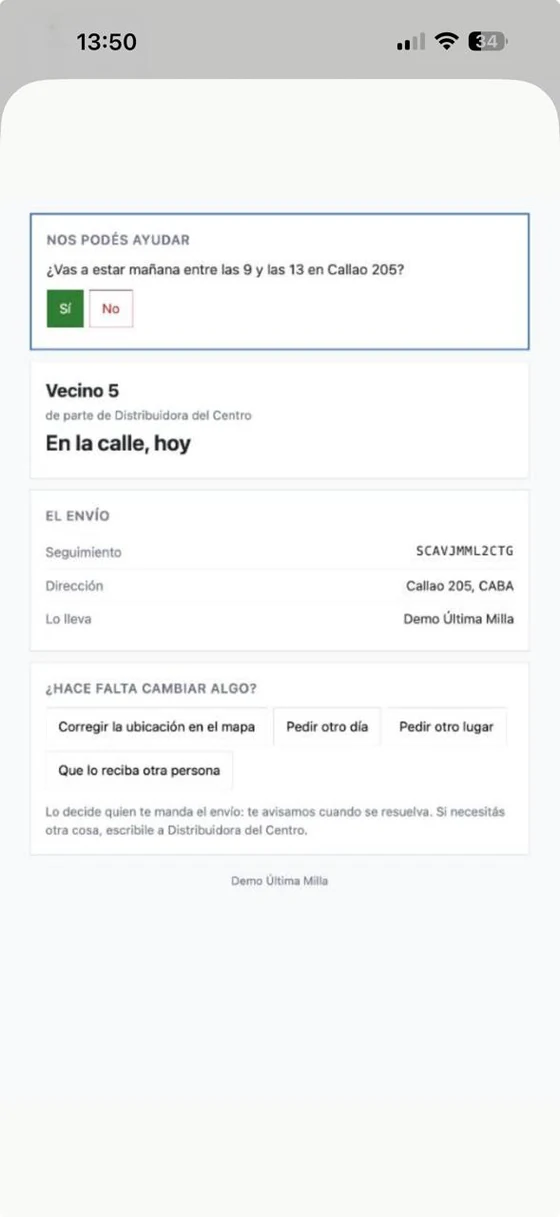
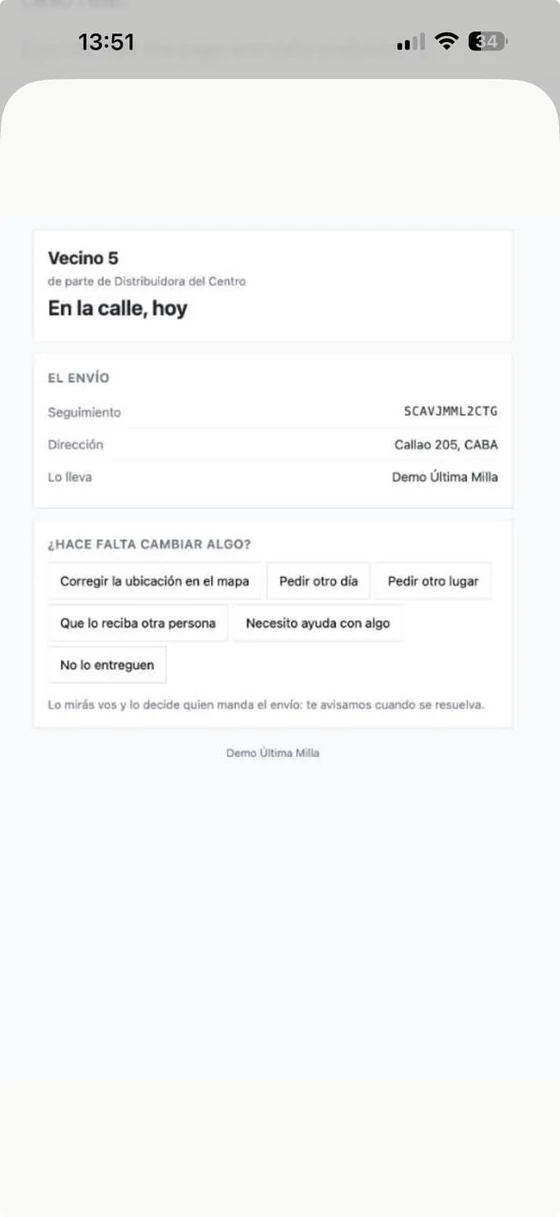
From that same tracking link, the recipient talks to your operation without picking up the phone. Every request reaches your operation as exactly that, a request: you accept it or turn it down. Nothing changes on its own, and you choose what they can ask for.
POSTPONE
"I won't be there"
They ask for another delivery day and propose when they'd rather receive it.
ANOTHER PLACE
"Leave it nearby"
They propose delivery at another address nearby, and your operation confirms it.
Deliver to: Corner store · 2 blocks away
WITH A NEIGHBOR
They authorize and it's validated with QR
They ask for someone else to receive it, a neighbor for instance. If you accept, a QR code confirms who receives it at delivery.
NEW VISIT
They agree on the next one
A new attempt gets agreed on without losing the record of the previous ones.
Visit agreed: Thursday afternoon
They can also fix the pin for their address on the map or answer a specific question you send them. Example screens, illustrative.
And the whole delivery cycle
Your customer, with their own portal
They open a link and see their shipments and their status, without being a system user.
Connected to your system
Orders can come in through the integration API or be imported, without entering them again.
And if you also store goods
Warehouse, picking, and storage, on the same platform.
Tell us how you deliver and we'll build it with you.
Try the system06THE DETAILS
The difference is in the details.
What's hard to find in a logistics system, handled where it happens: at the stop, on the dock, in the van, and in the warehouse.
AT THE STOP
Every minute at the stop is money.
Knowing the truck arrived isn't enough. Iterway knows whether it's waiting for a dock, docked, unloading, unloaded, or waiting on paperwork to leave, and how long it spent in each status. That time gets paid for: knowing it is what lets you bill it or avoid it.
In yellow, the waiting statuses: where the time gets lost. Each status keeps how long it lasted.
The driver collects and takes back returns, at the same stop.
The payments the driver collects from customers at delivery and the pallets they bring back to return, recorded where they happen.
STOP · DELIVERY · EXAMPLE
For whoever coordinates, too.
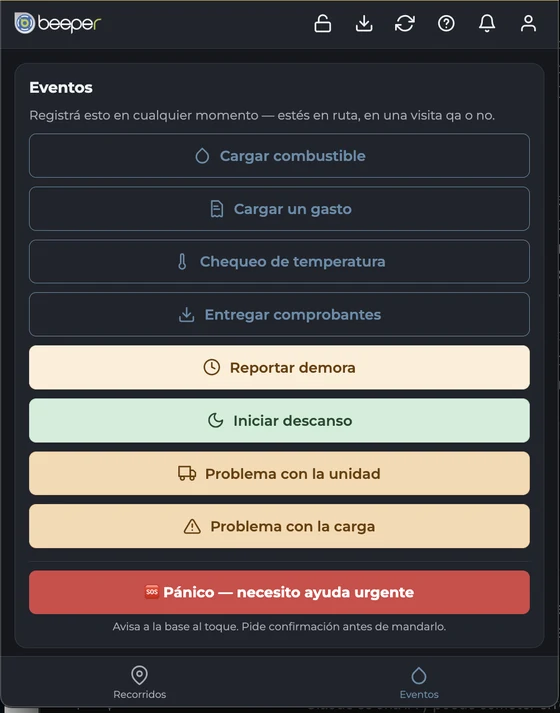
Whoever coordinates the loads works from Beeper, on the phone, with nothing to install. And if your operation consolidates or deconsolidates, cross-docking is in the same flow as everything else.
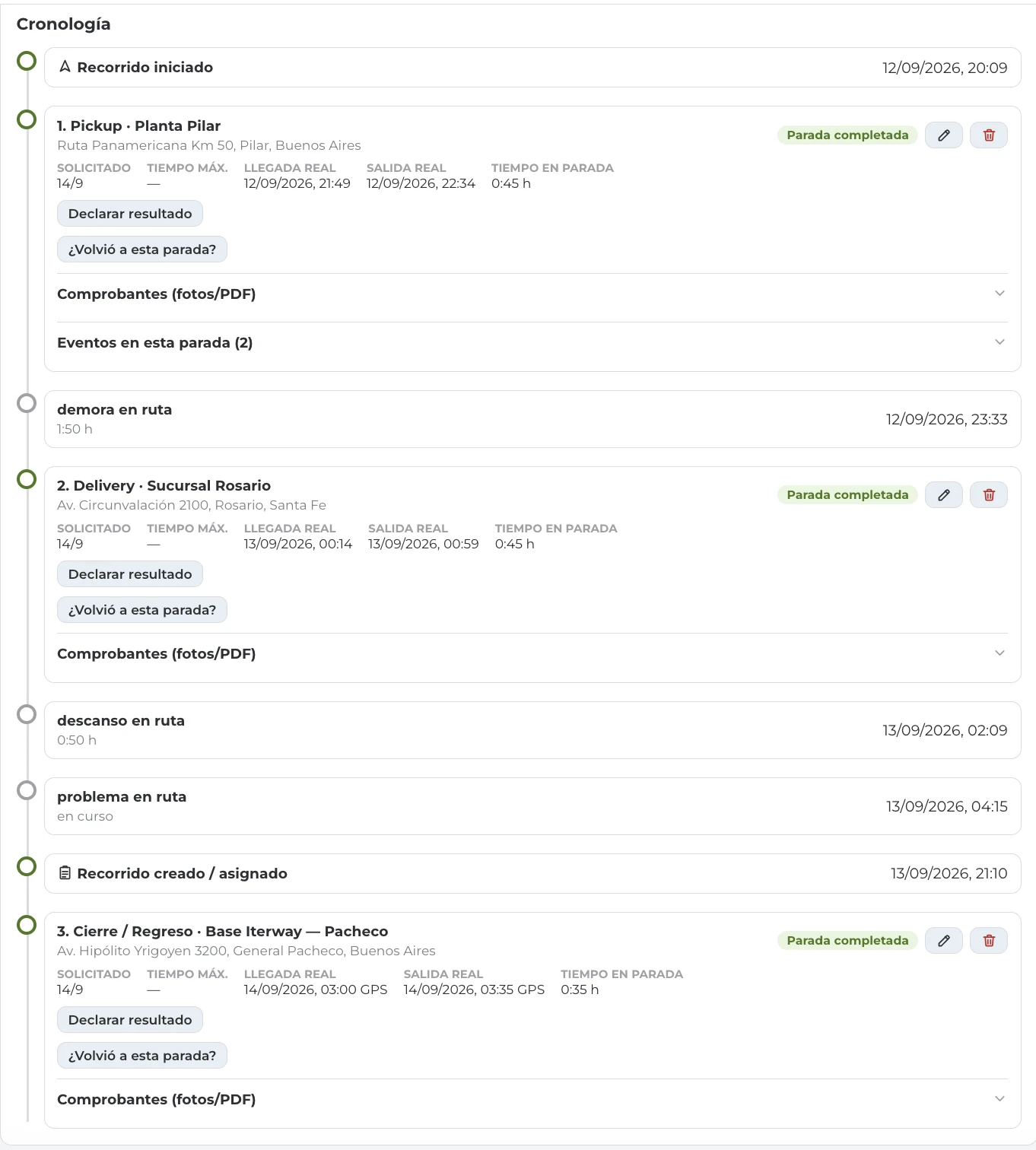
And each stop is left with its time, its delay, and its proof.
The route timeline keeps the actual arrival, the actual departure, the time at the stop, and what happened in between: delays, breaks, and problems on the road.
·IN THE VAN AND IN THE WAREHOUSE
With the phone and the camera, the work sorts itself out.
You load in delivery order.
You scan the barcode or the QR on each package and Iterway tells you which position on the route it goes in, so you can load it in the van.
LOAD THE VAN
Scan package
Package scanned · example
Goes in position 7
We read the label for you.
With artificial intelligence we read labels and tags, and the recipient's details load straight into your customer's recipient database.
PACKAGE LABEL · EXAMPLE
M. Fernández
123 Main St, City
Tel. 11 5555 0000
Name, address, and phone, loaded into your customer's database.
Pick & pack with the phone.
In the warehouse, whoever picks the order works from Beeper: scan, confirm, move on. No paper, no spreadsheets.
ORDER · EXAMPLE
- Item A · location A-01
- Item B · location B-04
- Item C · location C-02
·NOTICES AND ALERTS
If something serious happens, you hear about it. And it gets closed.
Critical alerts reach the right person as a notification and don't go away until someone resolves them. In the meantime, the team coordinates with messages inside the same system.
CRITICAL ALERT · EXAMPLE
Temperature out of range
Unit 12 · rear compartment
From the alert you mark it read, take the unit out of service, or resolve it.
MESSAGES · EXAMPLE
Dispatch
Check the refrigeration unit on unit 12.
Shop
We're already on it. I'll let you know when it's ready.
Messaging between the system's users, without leaving it.
Example screens, illustrative.
And there are many more. They get better all the time. The details show best in a demo, with your operation as the example.
Request a demo07WITH THE OUTSIDE PARTIES
Your operation doesn't end with your own crew.
Customers, suppliers, shops, and recipients take part without buying licenses: they come in with a link and see only what's theirs.
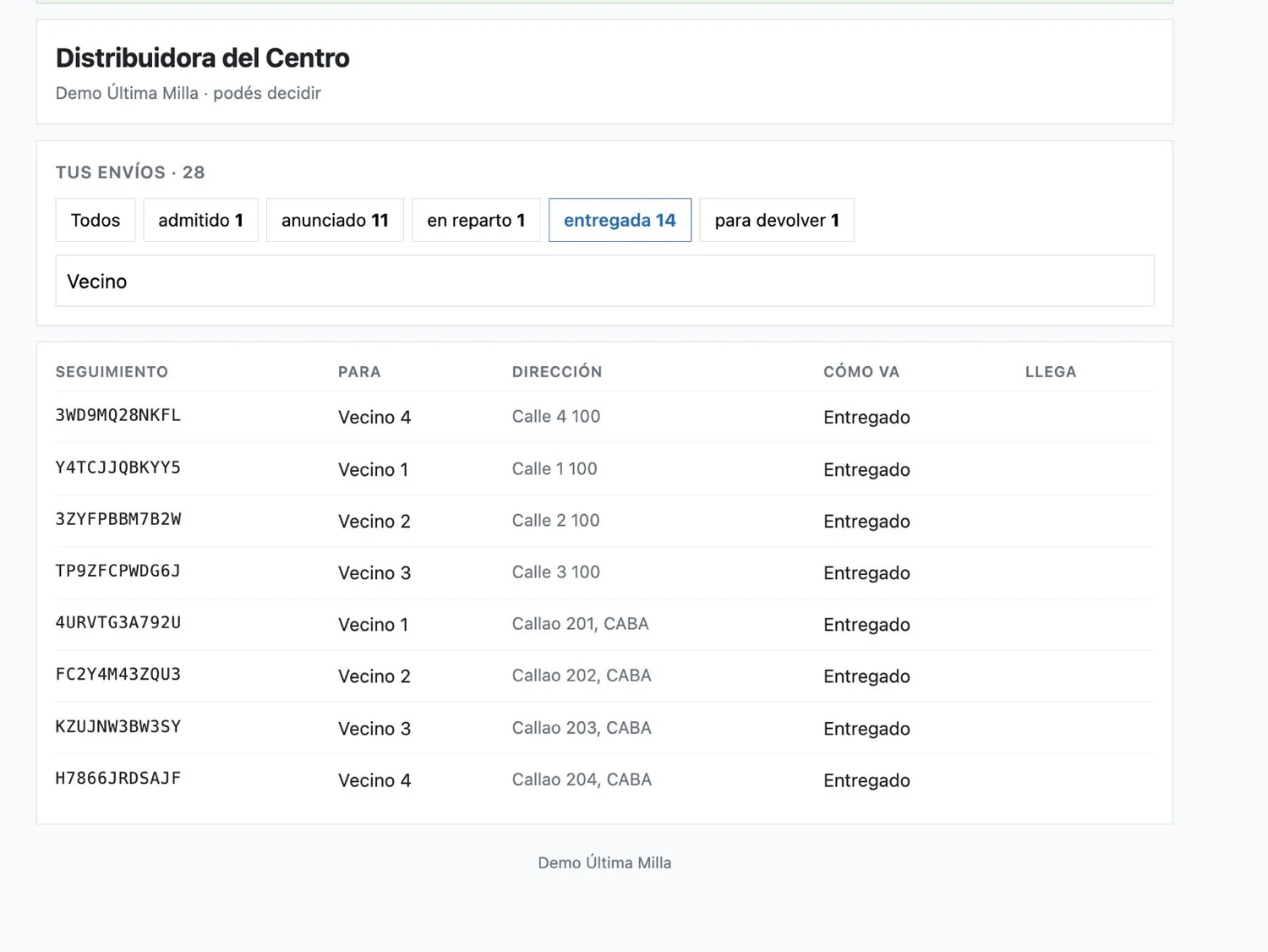
YOUR CUSTOMERS
Their own portal
They come in with a link and see their shipments, their status, and their documents. They aren't system users and they see nothing of anyone else's.
YOUR SUPPLIERS
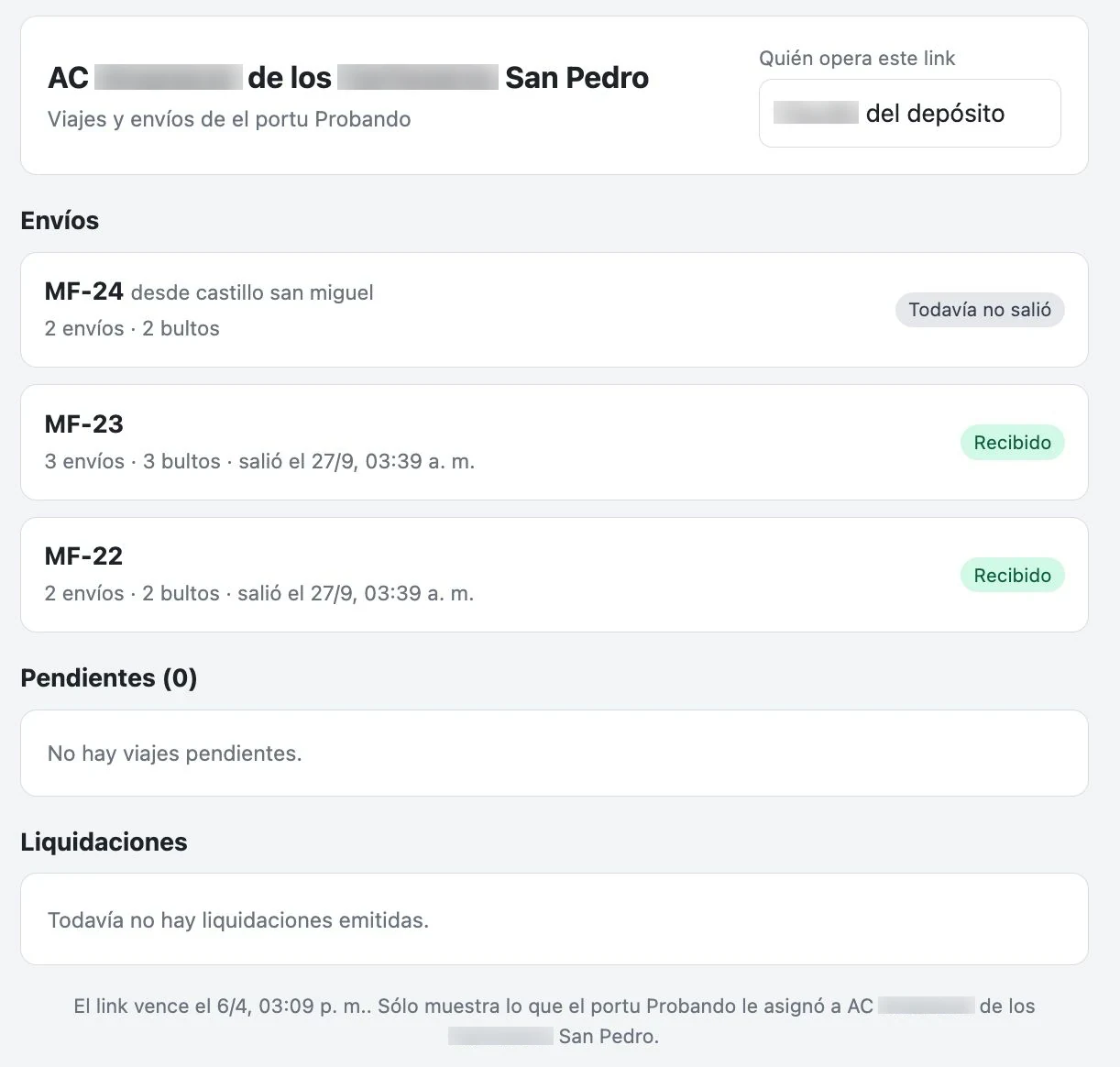
Each one sees their own
Carriers and third parties get what you assigned them and enter what's theirs to enter, with their own link that expires and that you can revoke.
YOUR OUTSIDE SHOP
Diagnosis from the phone
The shop that isn't yours enters the diagnosis and the work without asking you for an account or installing anything.
YOUR RECIPIENT
They track and decide
They track their delivery, push it back, propose another place, or authorize a neighbor, from the same link.
WITH YOUR OTHER SYSTEMS
If you already have an ERP, you keep it.
Orders come in through the integration API or get imported, and the data goes back to your accounting system. You enter it once.
- Integration API for orders and statuses
- Import of your current spreadsheets and data
- Tracking and telematics devices, declaring their signals
08HOW YOU START
Try it yourself, at your own pace, with help alongside.
You don't need a demo first. Leave your details and we'll give you access so you can go through the system on your own. You're not alone: there's a guided tour that walks you through it. If you'd rather talk first, ask for a demo.
WHAT THE GUIDED TOUR LOOKS LIKE · EXAMPLE
Step 3 of 5 · Enter your first order
Pick the customer and the destination. If you get stuck, ask Support.
Where do I pick the customer?
Top left, under "Requester". I'll point it out on screen.
YOUR FEEDBACK REACHES WHOEVER BUILDS IT
If something breaks or is missing, you tell Support. Any time.
Support is staffed 24 hours a day, every day. It doesn't just answer: it logs bugs and improvement requests and leaves them on a board the team reviews. It opens the ticket, keeps you posted, and you know where it ended up. If it's a bug, the team gets an alert to look at it right away.
A bug
Support logs it and tells the team right then.
An improvement
What you ask for gets written down in your words.
Something doesn't look right
You say it in the chat and it reaches whoever builds it.
EXAMPLE
I'd like to be able to filter the list by delivery date.
I logged it as an improvement request and passed it to the team. I'll let you know as soon as there's an answer.
Improvement request · under review
09SECURITY AND DATA
Your operation is yours. So is your data.
What you enter belongs to your company. Here, in a few words, is how we look after it.
The full details are in our policies, with each commitment spelled out.
Tell us how you work. We'll build it with you.
Ask for a demo so we can look at your operation, or leave your details and try the system on your own, with a guide.
Rather talk it through? Talk to Iter, our sales assistant.